PicsArt Crop Tool Makeover

Product Design
Role
Product Designer
Team
Product manager, Researcher,
Lead designer, Developers, QA
Project Overview
PicsArt mission was to empower anyone to make awesome pictures & provide seamless editing experience. We conducted a user research on “Crop Tool” ease of use and we found out that super users have been facing challenges by using it daily.

We had a clear mission for the product and conducted user research to understand the challenges users are facing with the crop tool. Based on the results of our research, it sounds like there is an opportunity to improve the crop tool and make it easier and more seamless to use. To achieve this, it was important to prioritize the needs and feedback of the super users, as they are likely to have the most insights into what's not working well with the current tool. To ensure that the redesigned crop tool meets the needs of the users, it's important to involve them in the design process. This could be done through ongoing user testing and feedback, iterative design and development, and collaboration with user researchers and product managers.
By focusing on the mission to empower anyone to make awesome pictures and provide a seamless editing experience, and by involving the users in the design process, we could create a crop tool that provides a positive user experience and helps users achieve their goals.
Goal
Facilitate Crop tool usage for Super Users (users who use crop tool on everyday basis).
Increase ease of use for Super users.

Problem & Impact

Problem
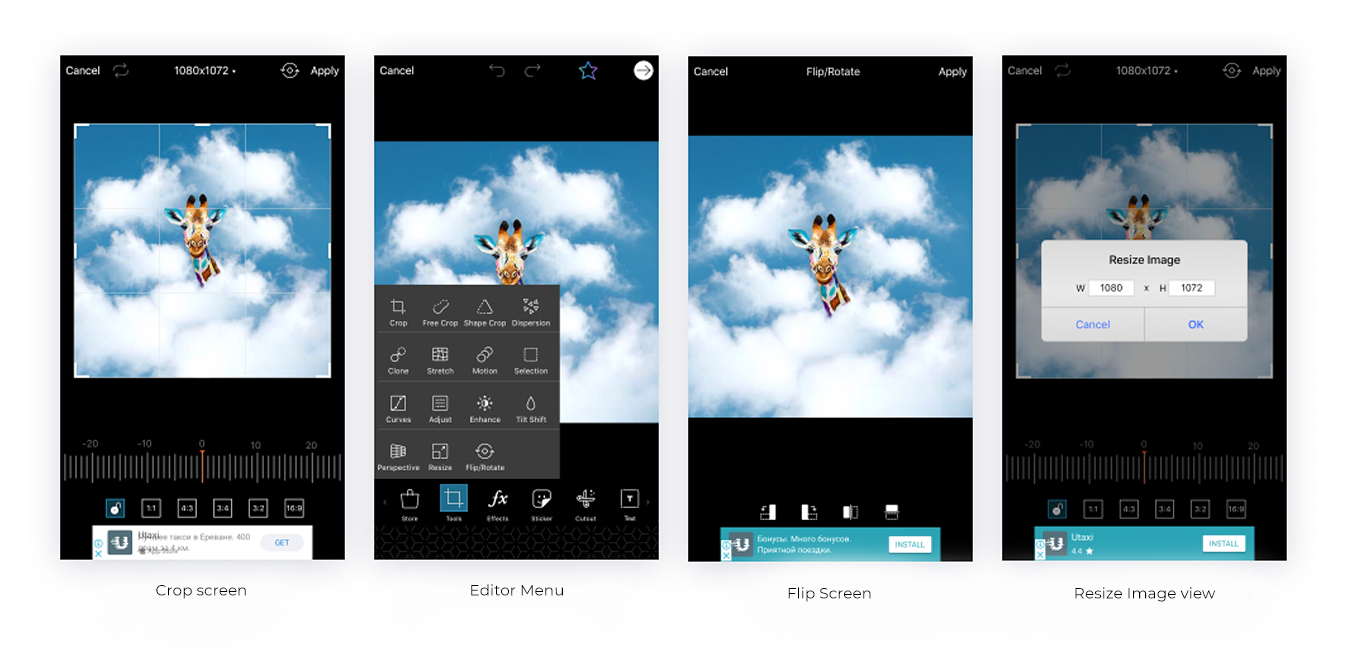
The research showed that crop tool was one of the most used functionalities in PicsArt Editor. It had functional issues and didn’t match the trends (out of date).

Other than that it had various interaction problems.
Solution
Primary actions are distinguished from Secondary (transform/custom crop & flip are considered secondary). This will help super users to focus on primary needs and eliminate visual friction points.

Design Process

1. Research
Competitive research
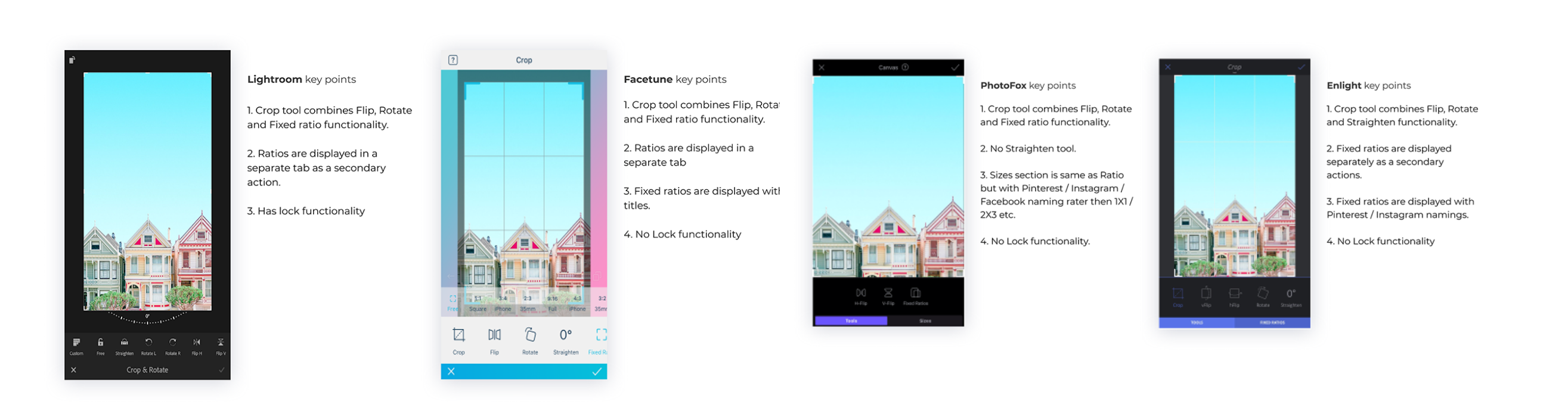
By analyzing the competition, we identified areas of improvements and made changes to the product and better meet the needs of our customers.

During the research, I reviewed our key competitors, such as Lightroom, Facetune and Enlight to find the the best solutions.
Understanding the Market
Competitive research provides an understanding of the market, the competition, and the current market trends. This information used to identify opportunities and threats, and to develop a unique value proposition. Also provided insights into customer preferences, behaviors, and needs, which used to inform product development and marketing strategies
PicsArt Crop tool research
• Primary free crop option was used in Crop tool, all other options are secondary

• When asked "Why do you crop your photos", users noted that they crop photos to share in social medias such as Facebook, Instagram or Pinterest

• Straighten ruler: no one used "Reset/ X" to bring to initial state, they slide the ruler manually to reach ''0''
• No one used reset icon on top navigation bar to reset changes in ''Crop''0, they closed & reopened ''Crop tool''

• Users were resizing the canvas size not from ''Crop'' but from ''Resize''

• Some users use rotate images from ''Flip/Rotate tool'', not fromCrop tool

• Users didn't understand the lock button usability
2. Sketches and Wireframes
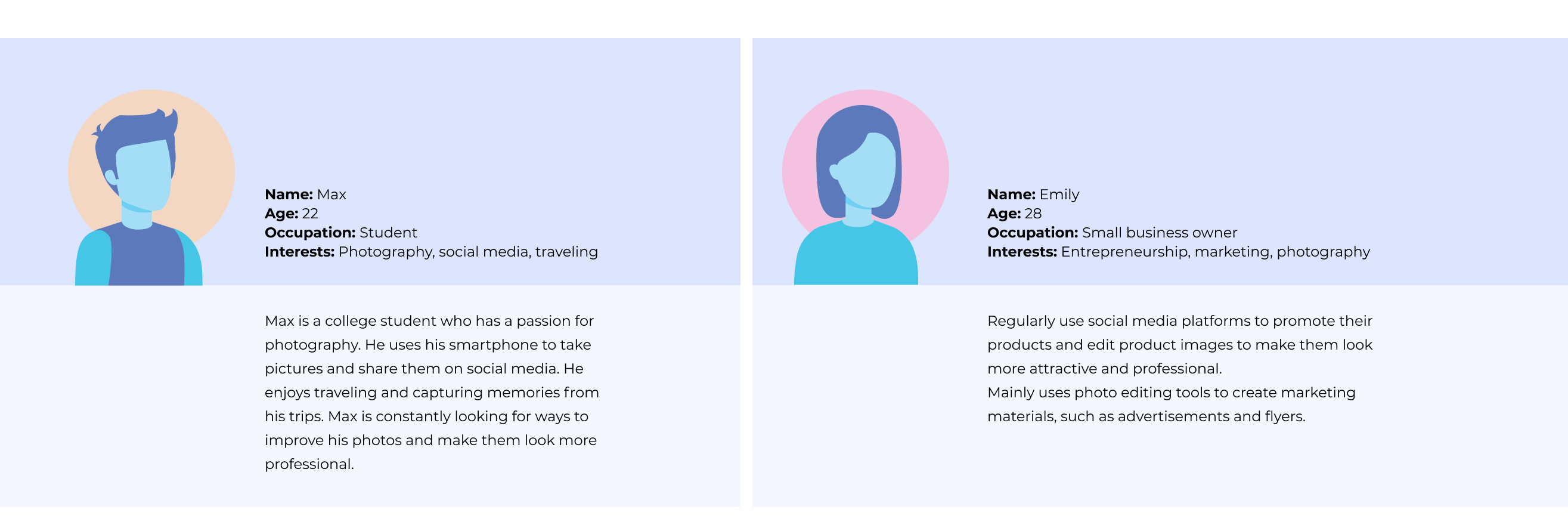
Understand the user personas
The user persona can be used to inform the design and development of the photo video editing image crop tool, ensuring that the tool meets the needs and goals of the target users. By understanding the motivations, behaviors, and pain points of the user persona, the tool can be designed to provide a better user experience and meet the needs of users like Max.
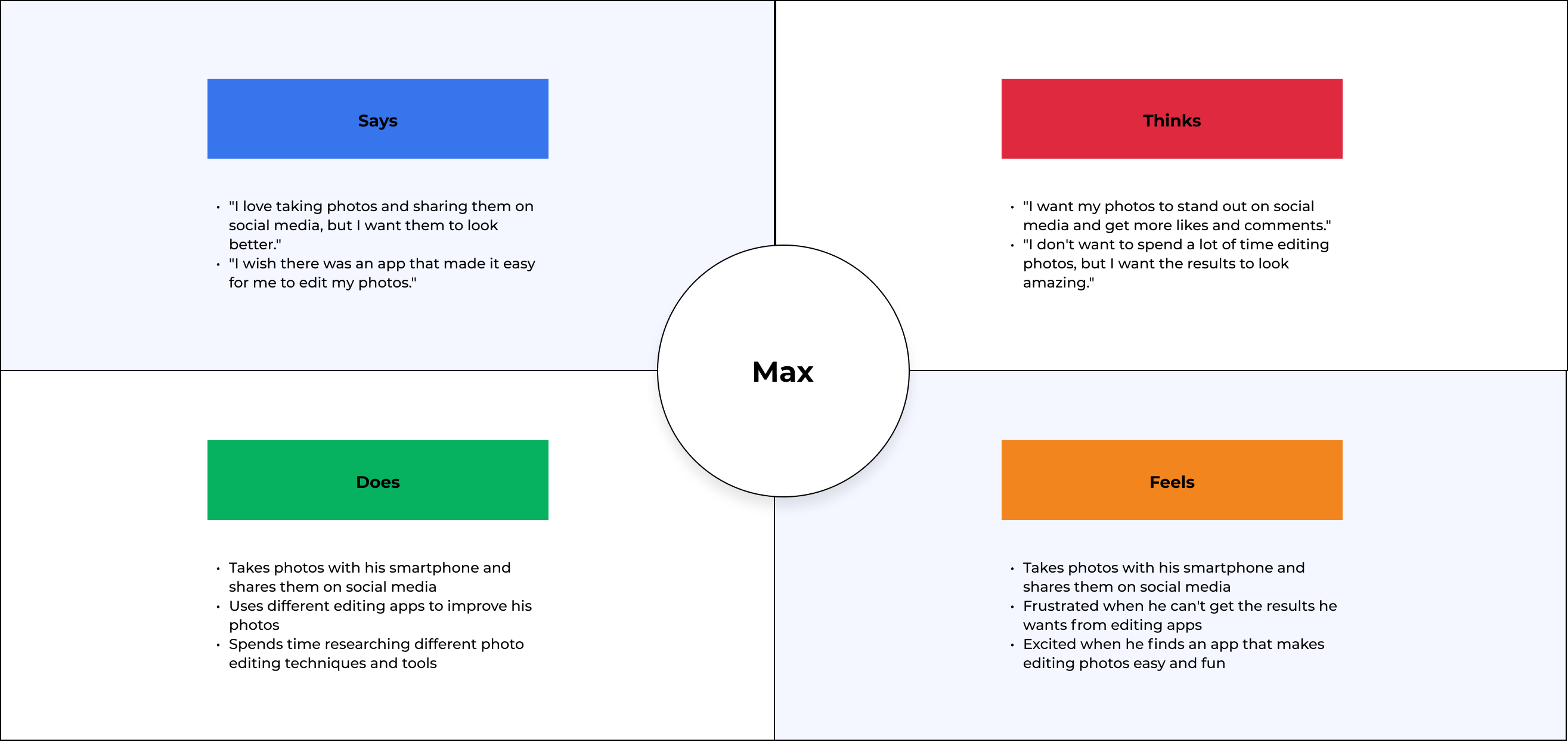
Empathy Map
The empathy map can be used to identify the key pain points and challenges faced by users of the image crop tool, which can then be addressed through the design and development of a more user-friendly tool. The ultimate goal of the empathy map is to improve the user experience and make it easier for users to achieve their goals when using the crop tool.
Sketches
Sketching is a valuable tool for product design and development, especially for user experience (UX) design. By quickly sketching out the user interface (UI) for different scenarios, we identified and solve challenges faced by users. By were sketching out full user flows, we could ensure that all scenarios are considered and no important steps are missed.
These allows our team to think broadly and consider multiple options before making any final decisions. This flexibility helped us made better decisions.
Once the sketches have been created, we it used as a starting point for more detailed wireframes and prototypes. This iterative process allows us to refine the ideas and test our designs with users, leading to a better end product.
3. User flows
User Flows
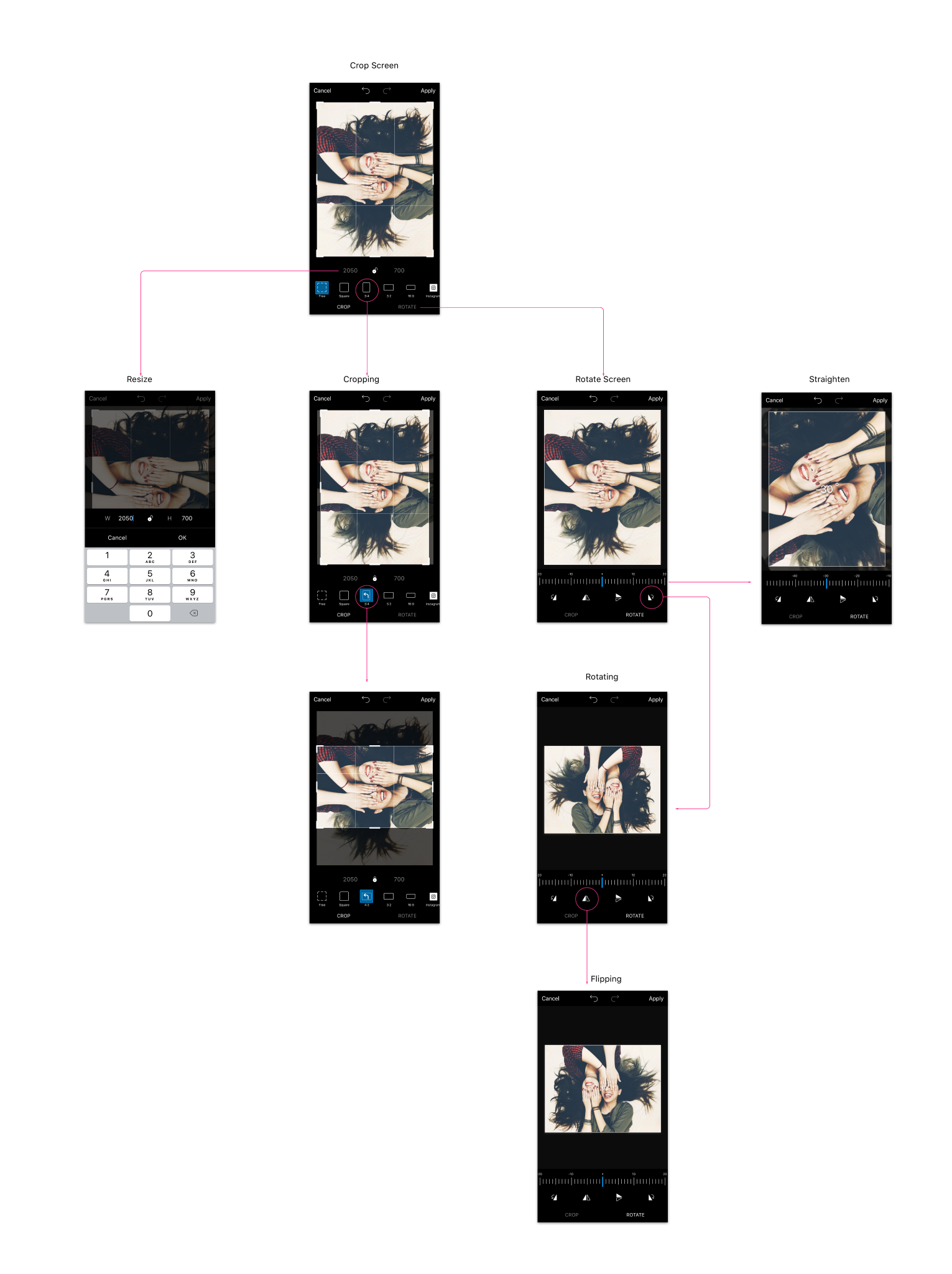
I draw a User Flow to have the full map of all the possible scenarios and also not to miss any extra cases and avoid dead-ends.

A crop editing tool user flow diagram would typically include the following steps:

Launch the tool: The user launches the crop editing tool from the main menu or from a specific image editing page.

Select the image: The user selects the image they want to crop.

Crop the image: The user uses the crop tool to select the portion of the image they want to keep, and then crops the image to the desired size and shape.

Adjust the crop: The user may choose to adjust the crop by resizing or rotating the image.

Preview the crop: The user previews the cropped image to ensure that it meets their desired specifications.

Save the crop: The user saves the cropped image and may choose to save it to their device, or share it directly with others.

Close the tool: The user closes the crop editing tool when they have finished using it.


This user flow diagram outlines the basic steps involved in using a crop editing tool, and can be modified or expanded based on the specific features and functionality of the tool. By understanding the user flow for a crop editing tool, we identified areas for improvement and make changes to enhance the user experience.
4. Exploration
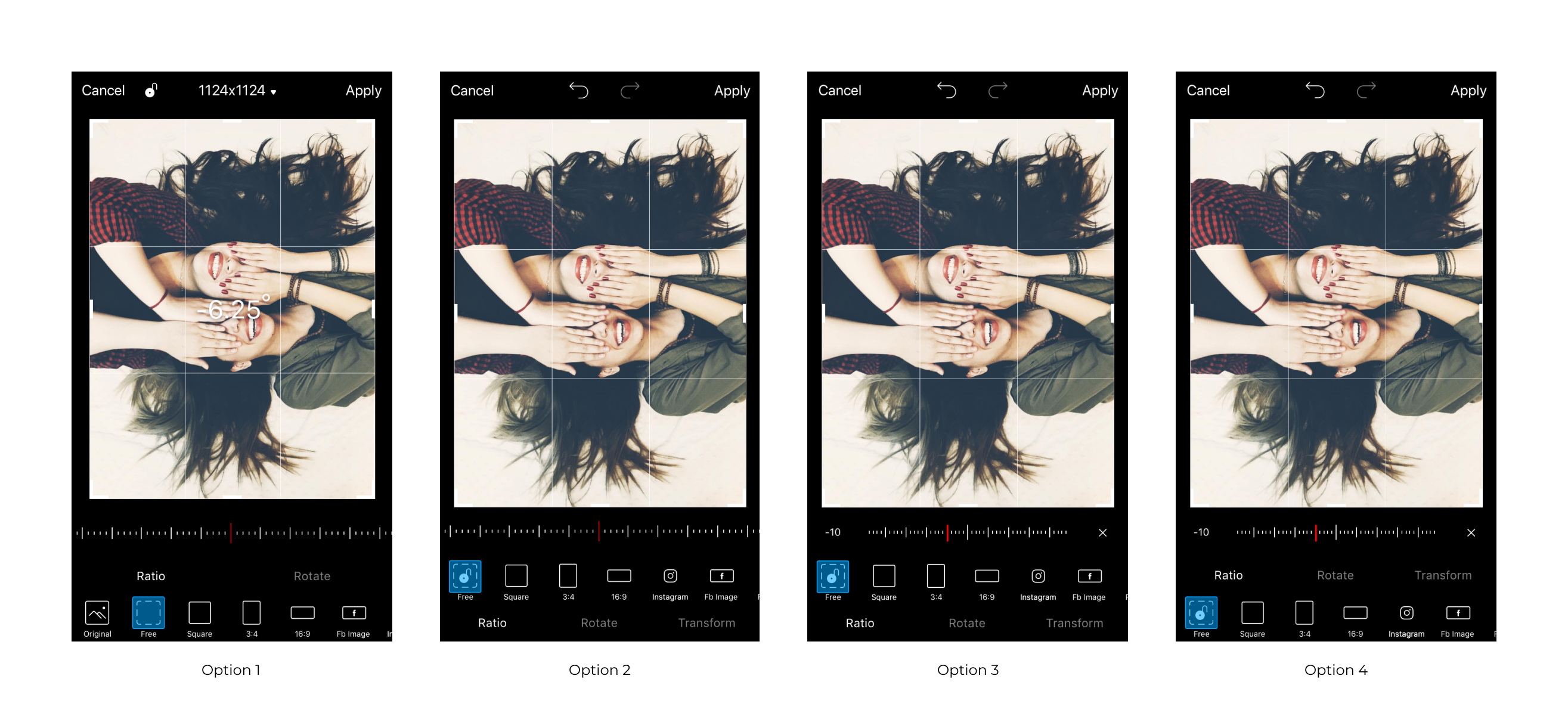
Each version followed the requirements and each of them has its own pros and cons followed by PicsArt Design library.

The app usually has its own strengths and weaknesses. When developing a new version, we consider the feedback from users and took into account any changes in the industry or technology.
By doing so, we improved and updated the Crop Tool to better meet the needs of super users and non-PicsArt-users. In the case of PicsArt, updating the design library in each version based on user requirements and the latest trends helped keep the app up to date and relevant. It's a good practice to continuously evaluate and update the software to ensure that it remains functional and user-friendly.
5. User Testing Feedback
User Testing
We came up with 3 solutions and tested the prototypes on both PicsArt and non PicsArt users.We conducted live prototype testing sessions with 25 users.
Super User Insights
We came up with 3 solutions and tested the prototypes on both PicsArt and non PicsArt users.We conducted live prototype testing sessions with 25 users.
Solution
Why users like this version
• All cropping actions was in one screen,
• Special crop frames for most used social platforms,
• Improved cropping interactions
Why users like this version
Distinguishing between primary and secondary actions is a good approach to streamlining the user experience and reducing visual friction points.

By focusing on the primary actions, you can ensure that the most important tasks are easy and intuitive to perform, and that the user is not overwhelmed by a cluttered interface.

By classifying certain actions, such as transform/custom crop and flip, as secondary, you can give the user the option to access these features if they need them, but keep the interface uncluttered and focused on the primary tasks.

It's also important to consider the trade-off between simplicity and functionality. While it's important to eliminate visual friction points and simplify the interface, you also want to make sure that the tool provides the features and functionality that the users need to achieve their goals.

Challenges
It was hard to touch the crop tool area, as it was  on of the most usable tools seamlessly include new UI patterns without touching current functionalities. Make sure it was strongly following PicsArt design library patterns.
Takeaways
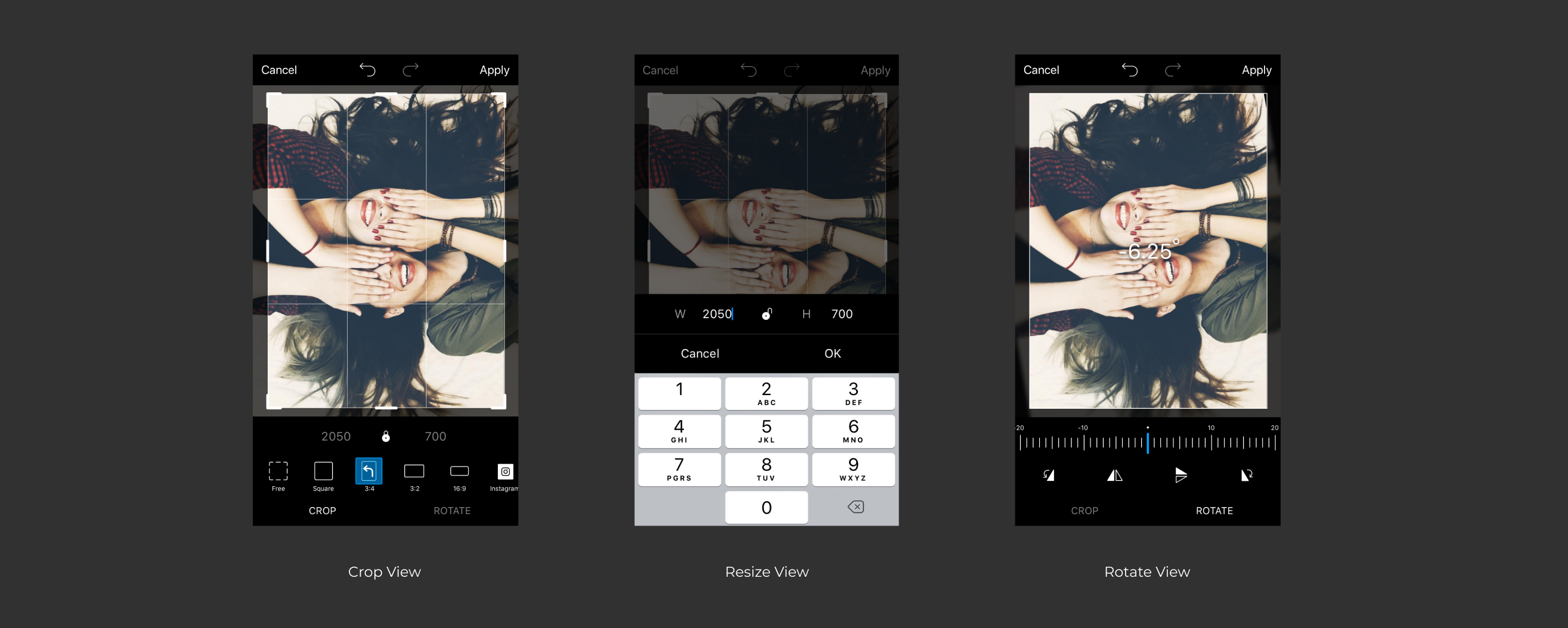
Merge Flip Rotate with Crop Tool to provide complete crop experience.

Consistent top navigation bar with Undo & Redo. This creates a consistency across the tools.

Added an easy to understand ratios such as Facebook / Instagram / Pinterest etc. This will simplify the super user experience and make it easy for them to create Business posters or crop their image for posting in Instagram or other social media.

When cropped the image it is very hard to reset the original image when dragging the edge handles, this was fixed and improve usability & experience for super users.

Straighten tool UI was made smaller to give more space to the image and support free crop functionality used by super users.

Added Lock option for custom crop (transform) this allows users to crop by keeping the ratio.